User Guide

Explore the interface, features, and music theory foundations of MusicArmonia.

Overview

MusicArmonia is an interactive laboratory that bridges the gap between music theory and creative composition. Explore key relationships, chord voicing grids, Neo-Riemannian networks, and transpositions in a unified, modern interface. All audio generation and theory calculations run entirely locally on your Mac.

Whether you are a composer writing a new piece, a music student studying voice leading, or a theorist exploring pitch space structures, MusicArmonia helps you visualize and listen to harmonic relationships in real time.

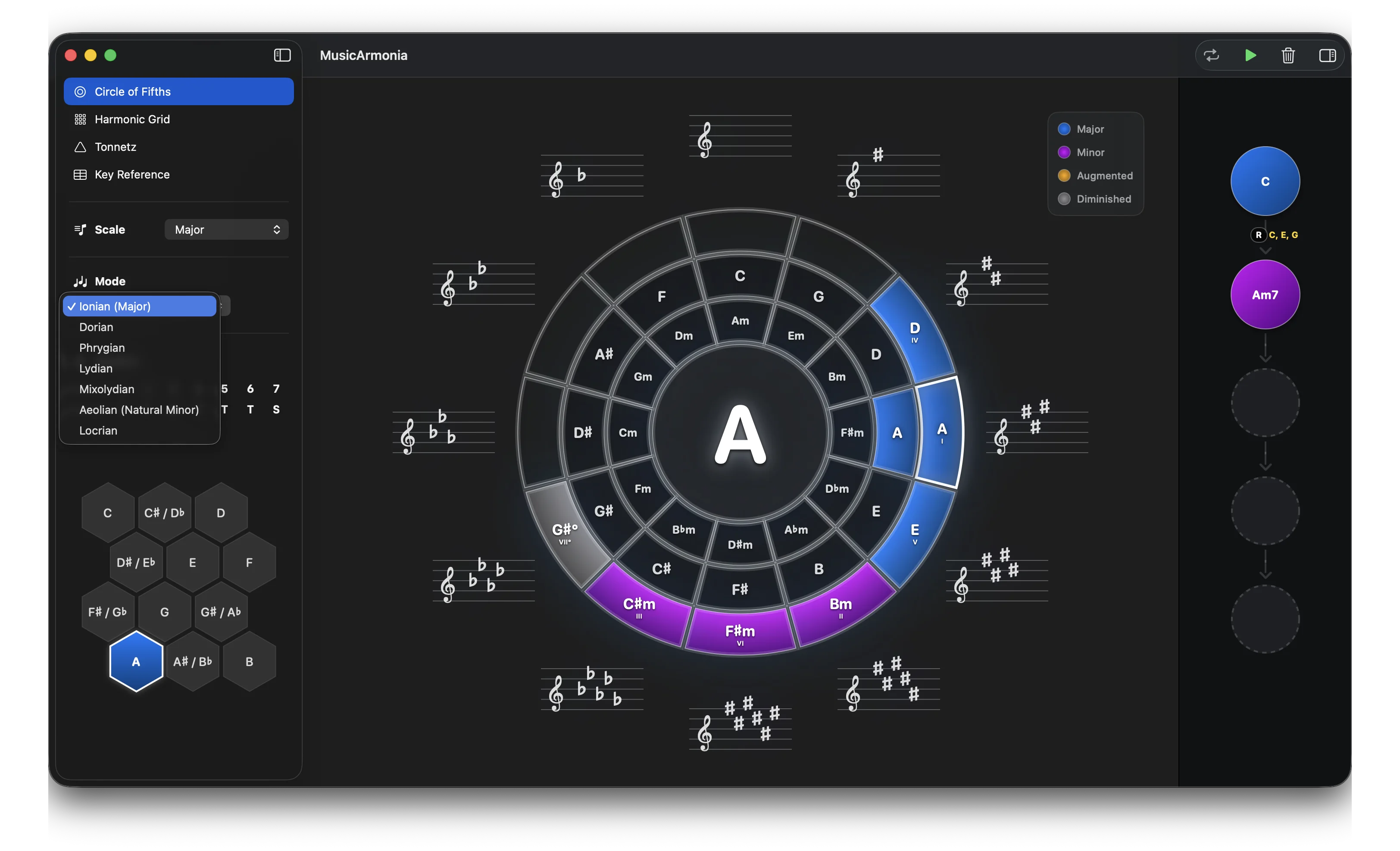
MusicArmonia main window showing the options sidebar, Circle of Fifths, and saved chords panel

Honeycomb Tonic Selector

Located in the Options sidebar, the Honeycomb Selector represents the 12 chromatic pitches as a honeycomb grid. Click a cell to set the key signature's tonic. Chromatic notes belonging to the selected scale are highlighted, providing a quick visual reference for your scale's pitch layout.

The Circle of Fifths

Harmonic Theory

The Circle of Fifths arranges the 12 chromatic notes in steps of perfect fifths (7 semitones). Adjacent keys are closely related: their key signatures differ by only a single accidental (e.g. C major has 0 accidentals, G major has 1 sharp). It provides a geometric framework for understanding modulations, relative major/minor scales, and diatonic functions.

How to Use the View

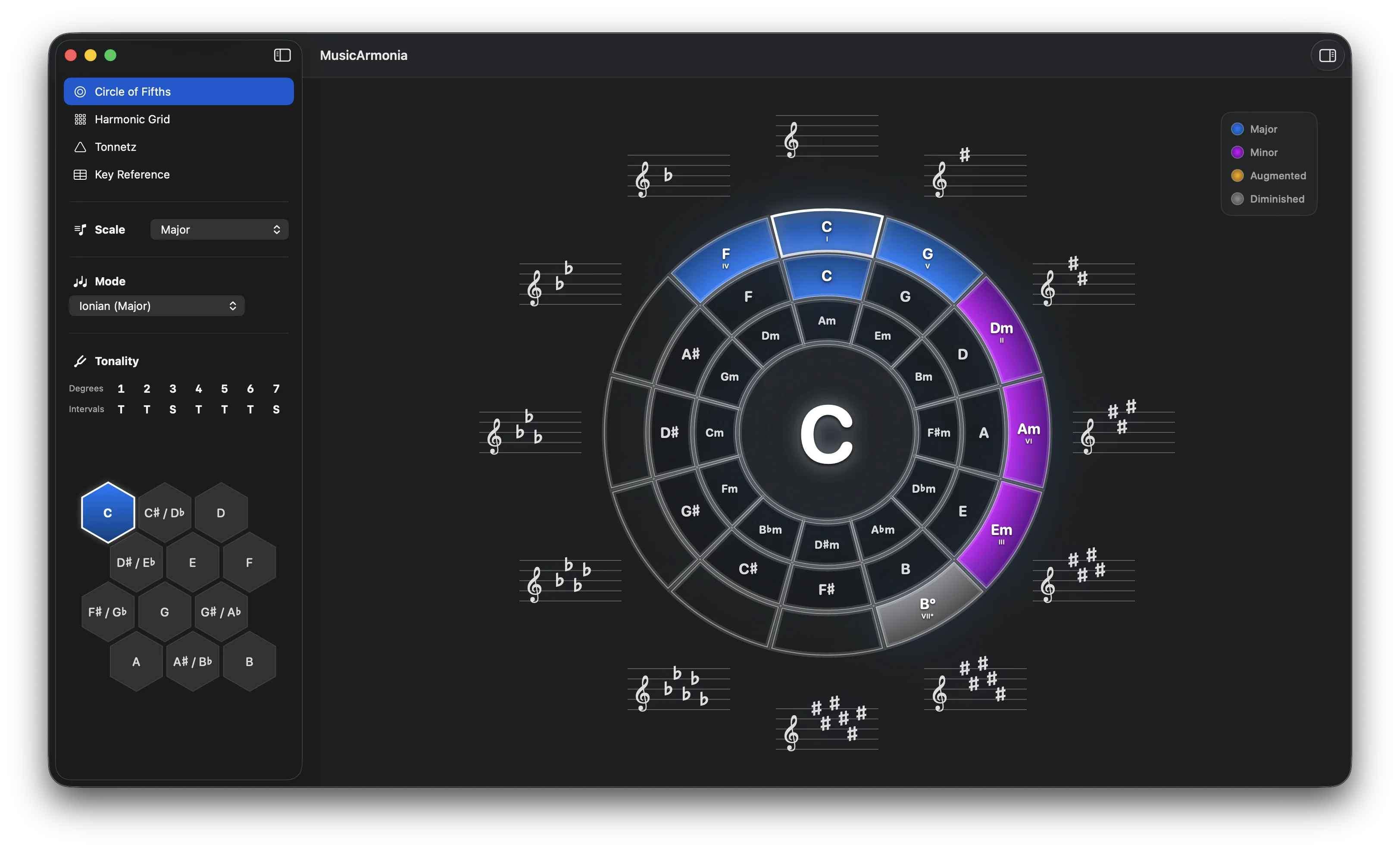
The interactive Circle of Fifths wheel is split into 4 concentric rings to display key signatures, notes, and functions simultaneously:

Circle of Fifths view with concentric rings and treble staff key signature display
Key Signature Staff Displays the active key signature (sharps or flats) rendered on a treble staff.
Diatonic Degree Ring Highlights the Roman numeral degrees (I, ii, iii, etc.) of the active key.
Scale Note Wedges Concentric rings representing absolute Major keys (outer) and relative Minor keys (inner).
Active Tonic Shows the active key root. Clicking different slices changes the key signature instantly.

Note: Major key chords are colored green, minor chords are red, diminished chords are orange, and augmented chords are purple. Toggle scale families in the Options sidebar to see how the dynamic rings adjust to represent diatonic chords.

The Harmonic Grid

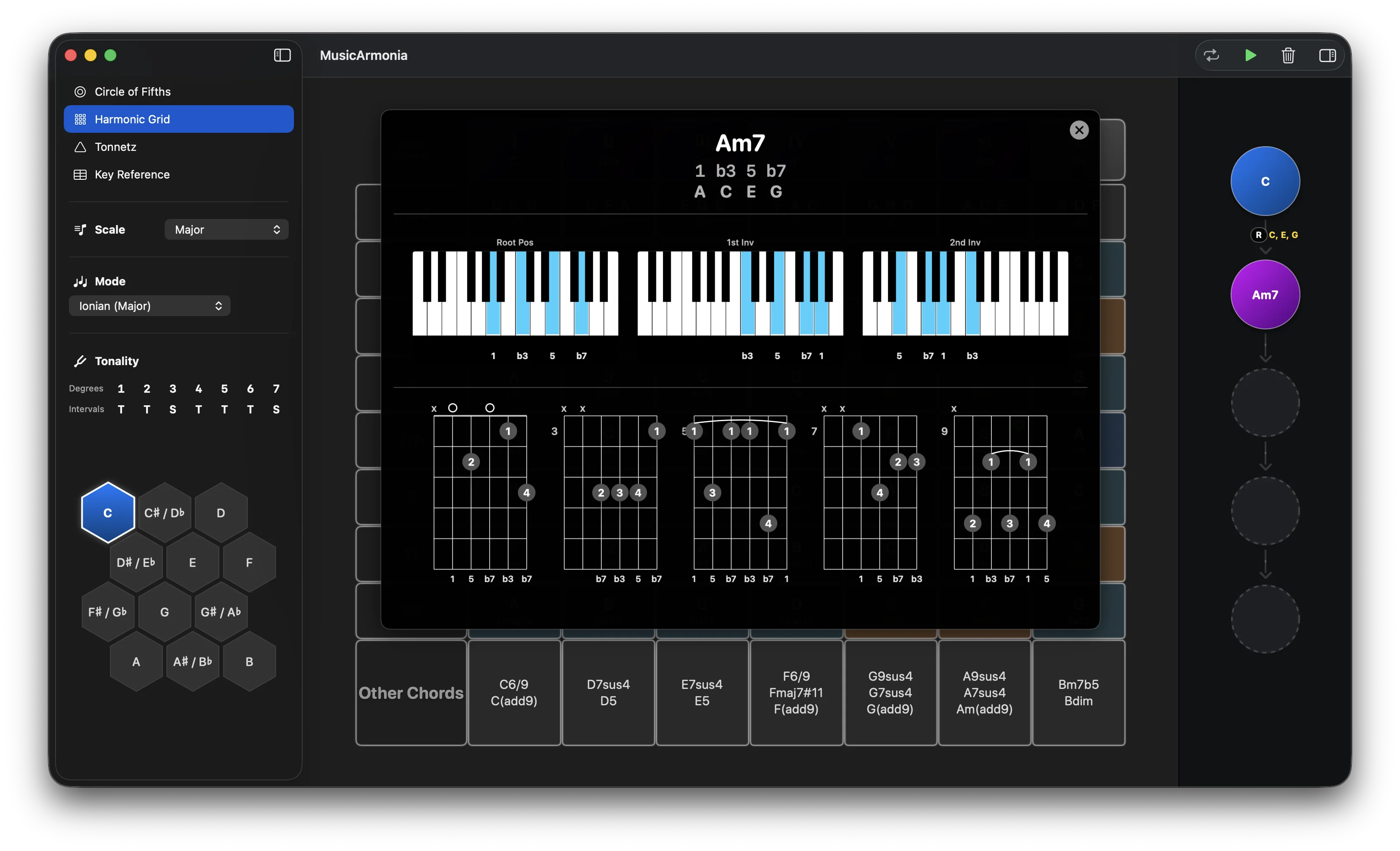
The Harmonic Grid lists diatonic chords in a clear rectangular matrix, grouping them by scale degree and harmonic function (Tonic, Subdominant, Dominant). This helps you visualize chord relationships relative to the tonic and analyze chord progressions in a structured layout.

Harmonic Grid view displaying diatonic chords arranged by function

Neo-Riemannian Tonnetz

Harmonic Theory

Pioneered by Leonhard Euler and popularized by Hugo Riemann, the Tonnetz (tone-network) is a slanted grid representing pitch space. Notes are connected along three geometric axes of consonant intervals:

  • Horizontal Axis: Perfect Fifths (P5, +7 semitones).
  • Upward Diagonal Axis: Major Thirds (M3, +4 semitones).
  • Downward Diagonal Axis: Minor Thirds (m3, +3 semitones).
Triangular cells in this grid represent triads: triangles pointing upwards are Major triads, and triangles pointing downwards are Minor triads. Neo-Riemannian theory analyzes chord transformations based on note preservation (minimal voice leading distance), focusing on three primary operations:
  • P (Parallel): Flips a major triad into its parallel minor (C major ↔ C minor) by changing the 3rd. It flips the triangle across its P5 edge.
  • L (Leading-tone exchange): Relates a major triad to its minor partner a major third above (C major ↔ E minor) by moving the root a semitone. It flips the triangle across its minor third edge.
  • R (Relative): Flips a major triad into its relative minor (C major ↔ A minor) by moving the fifth. It flips the triangle across its major third edge.

How to Use the View

Hover over the transformations panel to trigger and trace L, P, and R operations. The grid highlights the triad shapes and draws arrows between them, visualizing voice leading transitions. Common notes shared between chords glow to show how notes pivot during transitions.
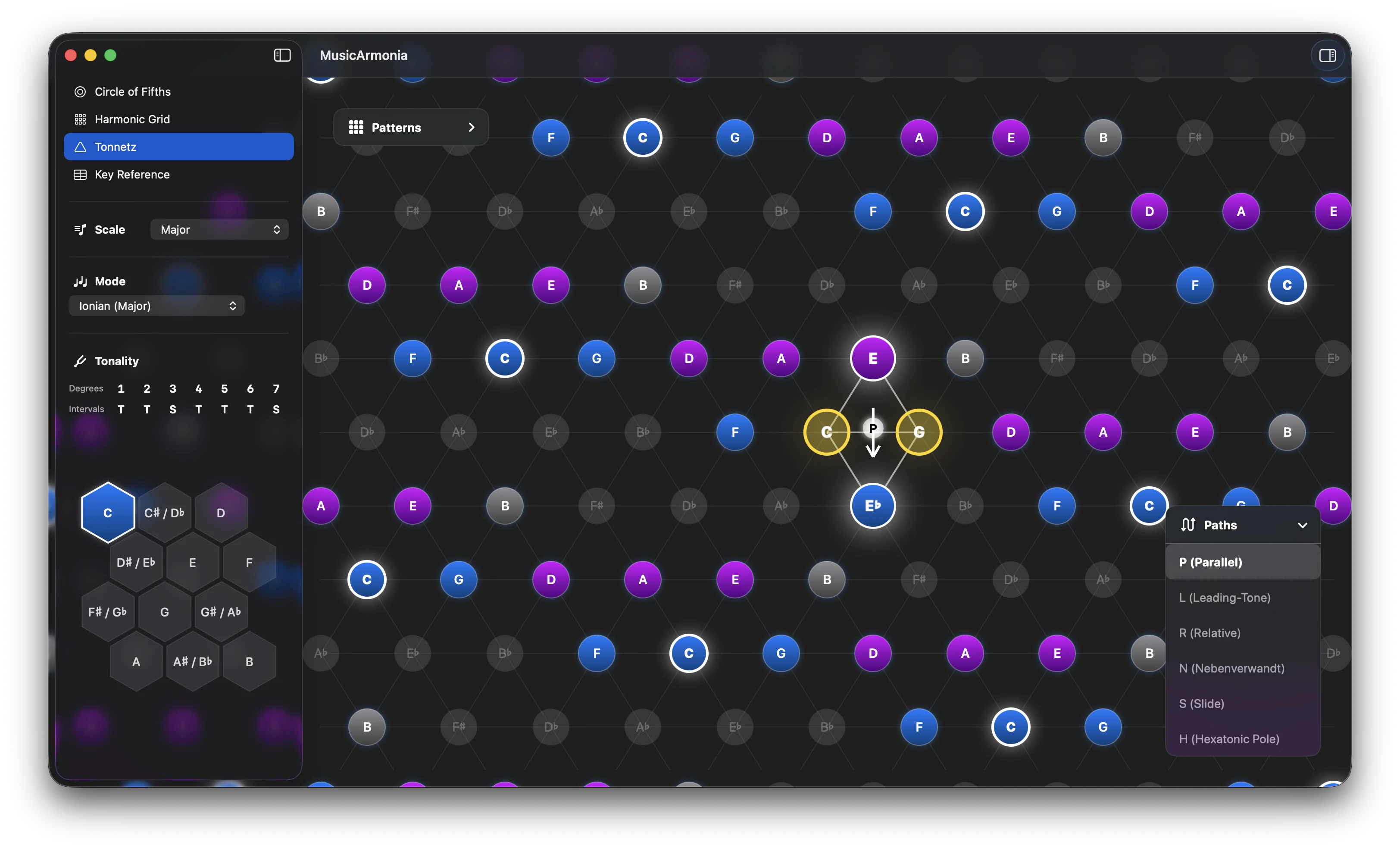
Tonnetz hexagonal slanted lattice displaying triad triangles and transformation paths
Pitch Class Node Nodes represent individual pitches. Clicking a node sets it as the key signature tonic.
Interval Axes Lines connecting notes by fifths (horizontal), major thirds (upwards), and minor thirds (downwards).
Triad Triangles Major triads point upward. Minor triads point downward. Highlighting shows active notes in your chord.
Neo-Riemannian Panel Hover or click transformations (like L-P-R paths) to watch the triangles flip across their shared edges.
Key Reference & Chord Builder

Harmonic Theory

The Nashville Number System and Roman Numeral Analysis abstract chord progressions from absolute pitches to relative scale degrees (e.g. I, IV, V, vi). This allows you to easily analyze harmonic relationships and transpose progressions instantly into any key.

How to Use the View

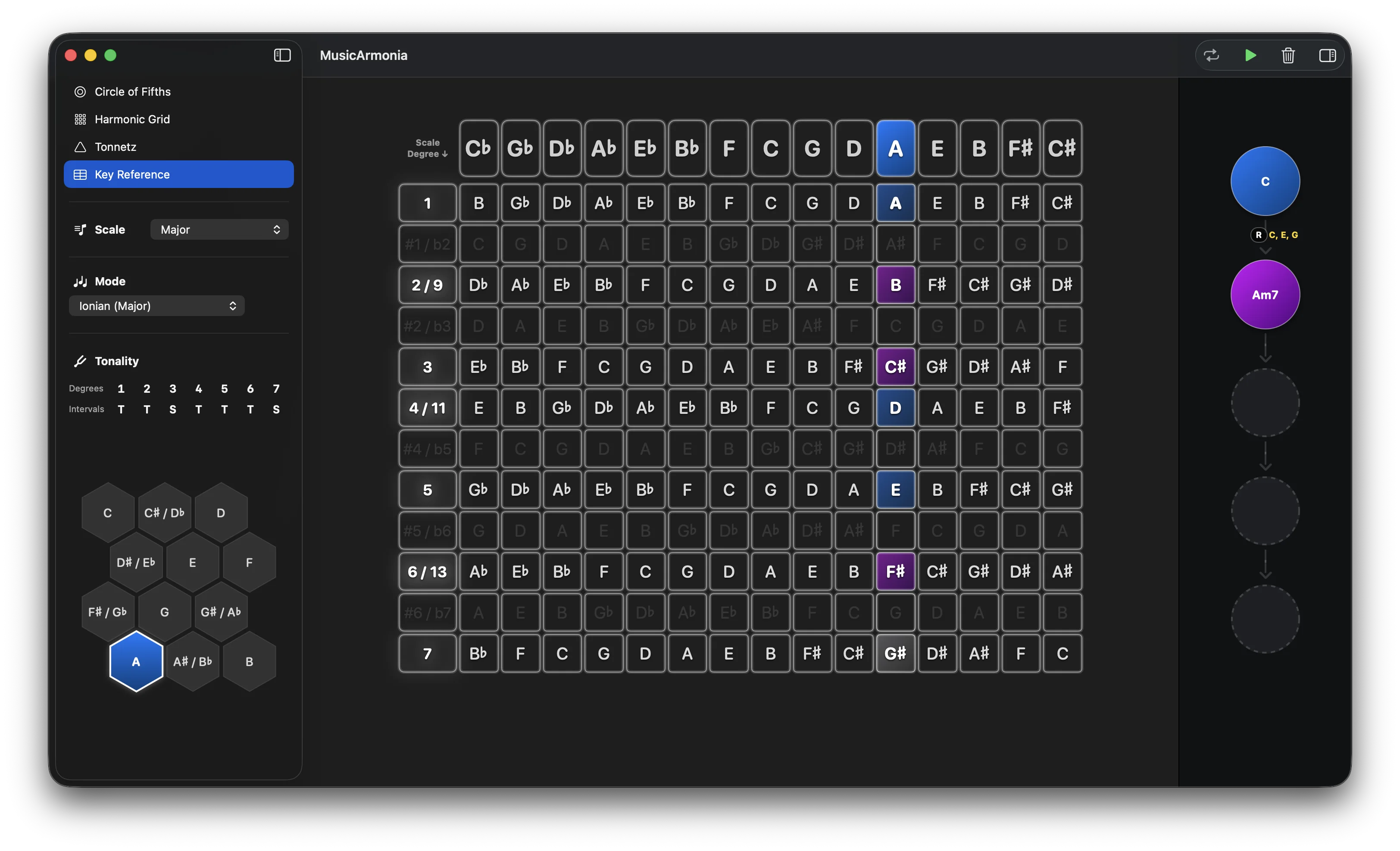
Select a key column at the top of the grid to set the active key. Tapping cells in the matrix lets you select notes and spell custom chords. The Harmony Analyzer identifies the chord name and lets you save it to your sequence. You can then transpose your entire progression by clicking different key columns at the top, transposing your saved chords instantly.

Key Reference view showing transposed chord builder matrix
15 Key Columns Arranged in Circle of Fifths order. Transpose the entire grid instantly by selecting a new column header.
Scale Degrees 12 interval rows representing scale intervals. Diatonic degrees are highlighted.
Interactive Chord Builder Click matrix cells to select notes and spell custom chords inside the active key column.
Harmony Analyzer Shows the identified chord spelling. Click '+' to save to your progression sequence or 'replace' to update.

Playback & Saved Chords

Open the Saved Chords Panel on the right to manage your active chord progression. Chords are played back in sequence using MusicArmonia's built-in synthesizer. Controls in the top toolbar let you play, stop, loop, or clear your saved chords.

Scales & Modes Configuration

Select your scale family in the Options sidebar to choose between 5 scale families and 23 modes:

Scale Family Available Modes
Major Ionian (Major), Dorian, Phrygian, Lydian, Mixolydian, Aeolian (Natural Minor), Locrian
Harmonic Minor Harmonic Minor, Locrian ♮6, Ionian Augmented, Dorian ♯4, Phrygian Dominant, Lydian ♯2, Super Locrian ♭7
Melodic Minor Melodic Minor, Dorian ♭2, Lydian Augmented, Lydian Dominant, Mixolydian ♭6, Locrian ♯2, Altered / Super Locrian
Pentatonic Major Pentatonic, Minor Pentatonic
Blues Blues Scale

System Requirements

Requirement Detail
macOS Version macOS 14 Sonoma or later (Native SwiftUI App)
Processor Apple Silicon (M1, M2, M3, M4 series) recommended. Intel processors also supported.
Storage ~50 MB local storage (completely self-contained, no network downloads)
Internet Not required. The app operates 100% offline.

Frequently Asked Questions

Can I export my progressions?

Progressions are saved locally in the application window state. Full MIDI/JSON export capabilities are planned for upcoming releases.

What is the difference between free and Pro versions?

The Free version gives you access to the Major scale family and its modes. Upgrading to the Pro version unlocks all scale families (Harmonic Minor, Melodic Minor, Pentatonic, Blues) and their corresponding modes, as well as saving custom chords in the Key Reference grid.

Where is my data stored?

All user configurations, selections, and saved chord lists are stored locally in the application's secure container on your Mac. No data is transmitted to external servers.

Is MIDI routing supported?

Audio playback uses the native Apple Synthesizer. CoreMIDI integration is active, allowing playback routing to your DAW of choice or virtual MIDI devices.

Contact & Support

If you have any questions, found a bug, or want to suggest new features, please contact us. We read every message and aim to reply within a few business days.

✉️

Email Support

Send your questions or feedback to support@musicarmonia.app. Please include your macOS version and Mac model if reporting a bug.

← Back to Home